
Capital
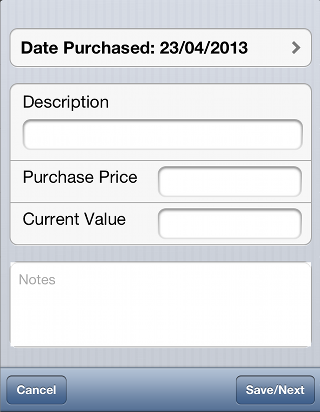
You can use this feature to track the original purchase price and current value of any capital purchases that you make where your tax authority treats capital purchases separately to other expenses. This screen is used to input new capital items, use the Capital Purchases report to see a list of capital purchases and to edit individual records.
Tap Save when you have completed all the details you wish to record. You will not be able to
save a record if any mandatory fields are missing. When all is well a 'Record Saved' message will
appear and (if you have enabled the option) the phone will vibrate briefly to indicate that the record has been saved.
Tapping on Cancel
when you have completed all the details you wish to record. You will not be able to
save a record if any mandatory fields are missing. When all is well a 'Record Saved' message will
appear and (if you have enabled the option) the phone will vibrate briefly to indicate that the record has been saved.
Tapping on Cancel will clear the fields
on the form when adding a new capital record, or return you to the capital list if you are
editing an existing record.
will clear the fields
on the form when adding a new capital record, or return you to the capital list if you are
editing an existing record.
Tapping Delete will, when editing an existing record delete that record.