
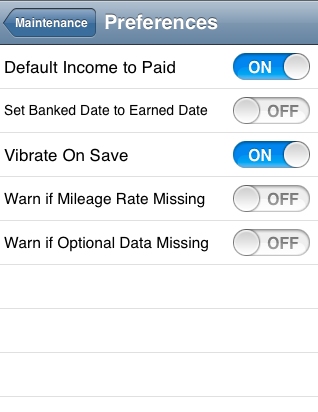
Maintain Preferences
The Preferences screen enables you to control a number of features of Simple BK that you can adjust to suit your way of working. Each feature is described in detail below.
Default Income to Paid
When recording a sale, there is a switch control on the form that indicates if the customer has paid you or not. Depending on how you run your business, set this to Yes if customers normally settle their accounts at the time of sale, or no if you usually issue customers with an invoice and they pay you at a later time.
Set Banked Date to Earned Date
The Banked date enables you to keep track of and reconcile cash at hand. Set this to Yes if you normally bank your takings on a daily basis and don't want to have to use the Banking report to update your records or no if banking is carried out less regularly.
Use iPhone Contacts
You may use the device's Contacts app to store customer and supplier details; or store them within the app. Set this switch to reflect your preferred way of working.
Vibrate on Save
If this is set to yes the phone will vibrate briefly whenever an Income, Expense or Travel record is saved. Set to No if you prefer the phone not to vibrate in these circumstances.
Warn if Mileage Rate Missing
You can set a default mileage rate that is applied to every travel claim for you. If this flag is set to yes Simple BK will warn you if there is no default mileage rate set every-time you enter the Travel screen. If you don't use a default mileage rate, set this to No to suppress the warning.
Warn if Optional Data Missing
It is not necessary to complete all the fields on the Income and Expenses screens. If you regularly choose not to complete all the available fields, set this to no to suppress unnecessary warnings. Set the switch to yes if you want to be reminded to complete the optional fields.
Default Values
Financial Year Start Date
Setting this date enable Simple BK to calculate your earnings-to-date for the current financial year.
Appointment Defaults
Setting a lag (day, week or month) and units enables Simple BK to present a draft appointment so many days, weeks or months on from the current date.