
Getting Started
Once you've got Simple BK on your device, the first thing to do is set up some income types - these are the products or services that you sell. To do this tap on More then Maintenance then Income Types.
The Income Types list will appear. Tap the Add button to get the add new screen.
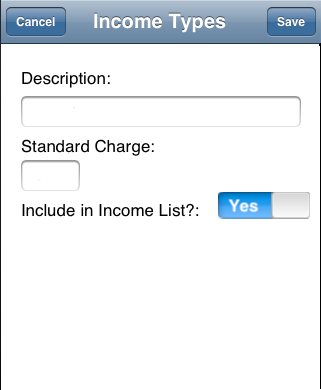
Add a description (maximum of 50 characters) and optionally a price. Set a price if you usually charge the same amount each time for this item. If you have a few standard charges for this item you can set up two or more items with the same description and different prices to make recording a sale quicker.
The 'Include in Income List' switch determines if the item is available to select when adding a sale. You can use this feature to retire income types that you no longer use, but that are associated with older records and so must be kept.
If you regularly buy items either to resell or to use in your business then you can add these as expense types in a similar manner to the income types above. see the Expense Items page for more details on how to do this.
And if you account for travelling expenses by claiming mileage, you will be prompted to set a mileage rate the first time you enter the Travel tab.
That's it! you are now ready to start recording your income and expenses.
Detailed instructions for every feature are available by following the relevant links in the main navigation panel, but using most features should be straightforward and not require explanation.